Google Glass App Lets Users Wink To Take A Photo
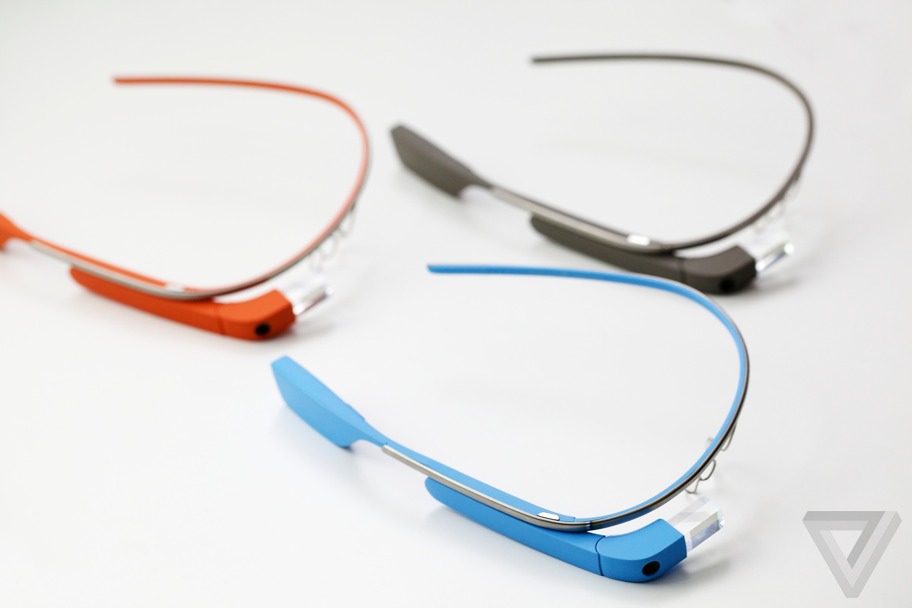
A Google Glass app that allow users to take a photo just by winking has been made available online.
Code for the Winky app was published on GitHub by developer Mike DiGiovanni yesterday.
"Winking really changes things. You might not think it's hard to say "Ok, Glass Take a Picture" or even just tap a button," he said on his Google+ page. The app will allow users to take a photo without using the side-mounted button or voice commands usually needed, Giovanni said.
"But it's a context switch that takes you out of the moment, even if just for a second. Winking lets you lifelog with little to no effort. I've taken more pictures today than I have the past 5 days thanks to this."
Giovanni's code bypasses code in the Glass OS that limits when the wink gesture should be recognised by the system and takes a photo every time the wink gesture is picked up by Glass.
A video of the app in action shows that the wink gesture is slower than the average unconcious blink, which should help prevent photos being taken accidentally.
The debate over whether privacy concerns will harm uptake of Google Glass was the subject of a recent Great Debate on ZDNet, with the majority of readers supporting the assertion that privacy concerns would hamper adoption.
(ZDNet)
MadCatz M.O.U.S 9 Gamesmart Mouse Review

Today it’s time to see what the country mouse cousin has to offer eager mobile gamers. The M.O.U.S 9 is another portable Bluetooth enable solution from MadCatz GameSmart line of peripherals. It serves up 10 programmable button, Bluetooth 4.0 and gaming grade 6400DPI Twin Eye laser sensor–just like the R.A.T.m. But this one is meant to be a companion to mobile gamers who feed their need with more action oriented titles such as Call of Duty: Black Ops 2, Battlefield 3, Borderlands, Far Cry 3 and the like. Surprisingly the M.O.U.S. 9 has retained the same style and design of it’s more fully functioning older sibling in the R.A.T. 9.

It’s true. The form factor and styling remain the same. But the M.O.U.S 9 has lost nearly half its weight. The intent of this mouse, is to offer gamers and general purpose computer users, all the comfort and convenience of the R.A.T. 9 without the complexity and versatility required by more diehard gamers. So the weight system, comfort adjustment tool and thus comfort adjustments themselves have been removed–mostly. You can still slide the palm rest back and forth like the R.A.T.m. Regardless, the M.O.U.S 9 benefits immensely thanks to these omissions. The lighter M.O.U.S 9 is much easier to wield. Moreoever, on the R.A.T. 9, I found the screws would become loose after a while, thereby neutering any comfort adjustment made. All that is shed with the lighter and simpler M.O.U.S. 9

The M.O.U.S. 9 installs just like the R.A.T.m. Remove the Bluetooth dongle from underneath the M.O.U.S. 9 and plug it into your computer, laptop, tablet…etc. Then download the drivers and the software (2-sperate installs). Install them and you’re good to go. Customizing your new M.O.U.S. 9 is easier than ever. Just drag and drop the function you would like set for each button over to its corresponding icon within the software utilities. Again there are 10 programmable buttons in all, which includes the secondary thumb wheel. That can be used as another scrolling option or outfitted with 2 completely different functions. You can also record macros, save them and drag them over to your desired button.

It’s more comfortable, much larger and the HAT switch is replaced with a “Precision button” among the “Forward” and “Back” thumb buttons. Hold this down to slow your DPI down to a crawl so my better line up head shots with more precision. It’s a handy tool in first-person shooters, one we’ve seen used on a few other mice like the Corsair M60. It’s also fabulous to use in Photoshop and other media editing software where fine movement can assist in image editing.

Yet for all the M.O.U.S. 9 offers, it’s still held from greatness by similar intermittent receptions issues. I can’t seem to recreate the problem consistently. It’s just finicky and jumpy for seemingly no reason. But only intermittently. I hope this can patched out. I would hate to see such a marvelous mouse get owned by a bug.
Bottom Line: The R.A.T.m may have been one of the best mobile mice we’ve tested. But the M.O.U.S. 9 is better in nearly every way. It enjoys the same lasting battery life. But it’s bigger, more comfortableand I personally prefer its precision targeting button over the 4-way HAT switch on the R.A.T.m. But pray to gaming gods that bug fixe emerges for the intermittent reception issues from which both mice suffer.
Pros
- Great performance for mobile gamers
- Solid battery life
- Great versatility
- Easy and expansive software suite
- Larger and more comfortable than R.A.T.m
Cons
- Pricey
- Brief moments of lag from reception interference
(gadget review)
(gadget review)
Tag :
Gadget
Gigabyte Fly On-Ear Headphone Review

One thing I like about PC peripheral provider Gigabyte is they don’t shy away from a challenge, frequently expanding their tech horizons with new product types. The company is more recognized for their excellence when it comes to providing kick ass motherboards. While video cards easily pull up in second place. But the company makes solid mice, keyboards and mobile computing options. Audio peripherals are far from their stock and trade.
That didn’t stop them from producing a pretty interesting set of highly durable and uniquely stylish headphones. The Gigabyte FLY are surprisingly just for music. There is no inline microphone or controls for answering phone calls or skipping tracks. You get an on-ear pair of cans which use a customized pair of Neodynium magnets which help to produce a heavier sense of bass. The adjustable headband is near invisible–it’s so thin and makes for an elegant look. It’s also made from a single piece of steel, so it’s durable and ultra flexible.

The unit is very lightweight, only weighing 79 grams. This adds to comfort and allows the FLY headphone sto worn for quite a long time. They may not sound quite as good as the phenomenal Mixr DJ headphones from Beats by Dre. But the Mixr set lose horribly to the FLY in the comfort arena. That razor thin steel band shows immense flexibility so they will never feel too tight around the ears. The padding on the ear pieces is also very soft. They work to effectively cancel out ambient noise, almost too well. While testing yesterday, I missed a phone call and a package from FedEx, which is a saying lot for on-ear.
Music is definitely the intent with the FLY headphones. But that heavy bass is sure to be too deep for some. It works great in a lot of drum-heavy tunes often found in hip hop, rock and reggae music. But the lack luster lows and struggling midrange sounds leaves the FLY playing favorites to a select group or music. Action movies work ok but when there is a lot of dialogue much of it sound too “throaty” from the deep bass. But again these are music and not promoted for movies. So with that, I suggest playing with the equalizer settings on you favorite playback devices. I found on both the HTC One and the iPhone 4s, the mid and low tones can be played up a bit with some setting changes. You are sure to have similar or better results with more sophisticated device EQs. However, a stellar set of cans should never rely on tricky device tweaks and setting changes to produce clarity and clean audio. This is the most significant shortcoming to the FLY’s performance, a general lack of clarity.

Yet if you are confident in your devices and their EQ settings and you have sufficiently bass-needy music playlists, then you could do worse.
Bottom Line: The Fly headphones from Gigabyte are not champions of clarity but they are stylish, massively comfortable, lightweight with deep heavy bass.
Pros
- Nice looking
- Deep bass
- Lightweight with long-lasting comfort
- Priced well
Cons
- Lackluster low tone
- Clarity could be cleaner
(gadget review)
Tag :
Gadget
'Monster University' Preview

Even on the rare occasion that a Pixar movie is a critical dud (we're looking at you, Cars 2), we're still curious enough to see them in droves. Every one of the California studio's 13 films has found itself the top film in the U.S. in its opening week.
So will Monsters U also graduate with honors? Judging by an advance screening I attended, the answer is yes. It's not the greatest thing Pixar has ever produced, and sadly can't hold a candle to the joyful sophistication of the original Monsters, Inc. It's a prequel, and a college picture, and those are some pretty serious limitations.
But Pixar fans who feared that the college setting would mean an endless stream of dumb frat boy gags — an animated Van Wilder — can breathe a sigh of relief. That teaser trailer featuring Mike Wazowski (Billy Crystal) as the victim of a dorm room prank that turns him into a disco ball doesn't feature, and isn't indicative of the film as a whole.
The movie opens with Mike on his first elementary school trip to Monsters, Inc., which is where he first gets the inspiration to enroll at MU. We then fast forward to his first semester at the University's famed scaring school, where he meets future partner James P. Sullivan (John Goodman) and future nemesis Randall Boggs (Steve Buscemi) — neither of whom are how we remember them.
The story of how Sulley and Randall changed is basically the story of this prequel. Though it is all told through Mike's eyes — sorry, eye — our hero remains admirably unflappable from the beginning.
About That Plot Inconsistency
Still irked by the Monsters U plot problem widely noted online — that if Mike tells Sulley "you've been jealous of my looks since the fourth grade" in the original movie, how come they're meeting for the first time in college?
Well, you'll be glad to know that bothers the high-ups at Pixar too. "We knew about it from the very beginning and we struggled with it ourselves," Monsters University director Dan Scanlon told Mashable. "We had considered versions where Mike and Sulley meet young. But we quickly realized we either had to make Monsters Elementary, which is not the story we wanted to tell, or we had to have them meet young and then re-meet in college.
"At the end of the day [Pixar veteran director] John Lasseter said to me, 'you have to do what's right for the movie.' That line was put in the original movie to give the feeling that these guys know each other for a long time. It was a difficult decision to make because we know fans really care, and because we really care, but not to the detriment of the movie — which would therefore hurt the other movie."
School Spirit
While Monsters, Inc. lovingly satirized the workplace — think of the immortal red tape-loving character Roz — Monsters U takes itself and its college environment a little more seriously.
This is probably due to the fact that Scanlon and his team watched just about every college movie ever made, from Revenge of the Nerds on down. "For some reason all great college movies came out in the 1980s," Scanlon says. "We had to immerse ourselves in those movies and figure out the tropes. We started soaking up what makes them work."
Thus does Monsters U rotate around a theme of fitting in, just as Nerds and those other 80s flicks did. Indeed, it's done a little too well.
Here are the popular monsters; over there are the nerd monsters, and the movie really wants you to care about the ebb and flow between the two groups. If it succeeds in drawing you in, you may wince at some of the more embarrassing moments.
But there is no real equivalent of Roz; no lovingly-drawn recurring character who is just so well-observed and over-the-top satirical that you cannot help but laugh. In her place is Dean Hardscrabble (Helen Mirren), a scuttling, flying creature who is supposed to be a supreme stickler for the rules — but then turns up as the patron of the campus' greatest rule-breaking entertainment, the Scare Games. The dichotomy doesn't quite work.Here are the popular monsters; over there are the nerd monsters, and the movie really wants you to care about the ebb and flow between the two groups. If it succeeds in drawing you in, you may wince at some of the more embarrassing moments.
Still, it's as stunningly good-looking as we've come to expect from Pixar, and the short that precedes it — the Blue Umbrella — is so groundbreaking it's worth the price of entry on its own. (More on that in a later post.)
(mashable)
Tag :
Miscellaneous
Instagram Tambahkan Fitur People-Tagging

Instagram menambahkan salah satu fitur paling terkenal dari Facebook - photo tagging - pada aplikasi iOS dan Android mereka. Anda sekarang sudah dapat memberi tag pada orang dalam foto Anda, dan melihat foto-foto apa saja yang telah di-tag dengan nama Anda.

Sebelumnya, jika Anda ingin mengetahui apakah foto Anda sudah diupload ke Instagram, satu-satunya cara adalah dengan melihat seluruh activity feed, berharap seseorang telah mention Anda pada caption foto tersebut (contoh @junior_wijaya). Sayangnya, mention @ tidak akan langsung dijadikan tag. Jika Anda ingin menambahkan tag pada foto lama Anda, Anda harus melakukannya secara manual, satu per satu
.
Sekarang, jika seseorang memberi tag nama Anda pada foto mereka, Anda akan mendapat notifikasi dan foto tersebut akan ditambahkan pada fitur baru, yaitu "Photos of You". Anda juga dapat mengatur agar foto-foto tersebut harus melalui konfirmasi Anda sebelum masuk ke bagian Photos of You. Fitur tersebut akan mulai berjalan pada 16 Mei.
Untuk mencoba fitur baru Instagram ini, langsung saja upgrade aplikasi anda ke versi 3.5 pada Apple App Store atau Google Play Anda.
(mashable)
Tag :
Info
Google Shakes Up Developer Conference With 3-Hour Keynote

Google has made the preliminary schedule for its annual developer conference available online.
Google I/O 2013 kicks off at the Moscone Center in downtown San Francisco on May 15. The three-day conference will have one noteworthy change this year: a three-hour keynote.
Google has traditionally divided its keynote up over two days, the first day focusing on Android, and the second on Chrome. This year there will only be one keynote event, held on May 15 from 9 a.m. to noon.

Google uses I/O as an opportunity to showcase new products and software. At last year’s I/O it announced Android 4.1 "Jelly Bean" and the Nexus 7 tablet, among other things. Skydivers also demonstrated Google Glass by live streaming a jump from above the Moscone Center where the keynote was being held.
This year Google has already scheduled four developer sessions around Google Glass, with more potentially added before the schedule is finalized.
You can check out the current Google I/O schedule here.
What do you think Google has in store for this year’s I/O? Let us know your thoughts in the comments.
(mashable)
Tag :
Info
Is a Cheaper HTC One Variant On its Way?

An image of HTC M4, a smartphone similar in appearance to HTC One but reportedly much cheaper, has been unearthed by PhoneArena.
The M4 seems to be just a codename; the device could have some form of HTC One branding, according to the report.
Whatever it's called, the smartphone won't have One's flashy aluminum unibody construction, and its specifications spell mid-range: A dual-core CPU, 2GB of RAM, 16GB of storage and HTC's UltraPixel tech for taking good-looking photos with a relatively low megapixel-count.
The HTC M4 is reportedly launching near the end of Q2 2013, with LTE and Android 4.2 Jelly Bean.
Are you excited about a device that's similar in appearance to the HTC One, but cheaper? Share your thoughts in the comments.
(mashable)
Tag :
Info